
After-Sales Support and Resolution Feedback Form
What is the After-Sales Support and Resolution Feedback Form? The After-Sales Support and Resolution Feedback Form is a comprehensive Google Forms templat…
What is the After-Sales Support and Resolution Feedback Form?
The After-Sales Support and Resolution Feedback Form is a comprehensive Google Forms template designed to capture customer experiences and satisfaction levels following their interaction with support services. This free form template serves as a crucial tool for businesses to evaluate the effectiveness of their customer service teams, technical support departments, and resolution processes. By collecting detailed feedback about post-purchase support experiences, companies can identify areas for improvement and ensure their customers receive exceptional service throughout their entire journey.
This specialized feedback form focuses specifically on the critical period after a customer has made a purchase and required assistance, whether for technical issues, product inquiries, warranty claims, or general support needs. The form template systematically gathers insights about response times, communication quality, problem resolution effectiveness, and overall customer satisfaction with the support experience. Organizations across industries use this Google Forms template to maintain high service standards, reduce customer churn, and build stronger relationships with their client base through continuous improvement of their after-sales support processes.
Who Should Use This Form?
This After-Sales Support and Resolution Feedback Form template is ideal for customer service managers, support team leaders, quality assurance specialists, and business owners who want to monitor and enhance their post-purchase customer experience. E-commerce businesses, software companies, telecommunications providers, electronics retailers, automotive dealerships, and service-based organizations particularly benefit from this form template. Customer success managers can use this Google Forms template to track support ticket resolutions, while product managers can gather insights about common issues requiring after-sales assistance. Small businesses and startups can leverage this free form to establish professional feedback collection processes, while enterprise organizations can use it to standardize feedback collection across multiple support channels and departments.
Form Questions & Fields
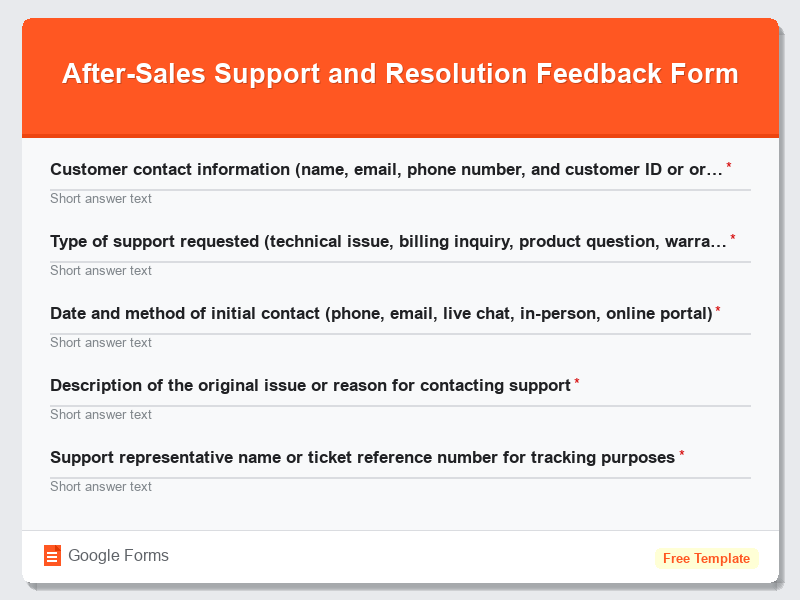
- Customer contact information (name, email, phone number, and customer ID or order number)
- Type of support requested (technical issue, billing inquiry, product question, warranty claim, return/exchange, installation help)
- Date and method of initial contact (phone, email, live chat, in-person, online portal)
- Description of the original issue or reason for contacting support
- Support representative name or ticket reference number for tracking purposes
- Response time rating from initial contact to first response (excellent, good, fair, poor)
- Communication quality assessment including clarity, professionalism, and helpfulness of support staff
- Problem resolution status (fully resolved, partially resolved, unresolved, escalated to another department)
- Overall satisfaction rating with the support experience using a 1-10 scale
- Additional comments and suggestions for improving the after-sales support process
How to Use This Google Form Template
- Access the After-Sales Support and Resolution Feedback Form template through Google Forms and click “Use Template” to create your customized version. Sign in to your Google account and the form will be automatically copied to your Google Drive for immediate editing and customization.
- Customize the form fields and questions to align with your specific business needs, support processes, and industry requirements. Modify question types, add your company branding, and include any additional fields relevant to your after-sales support workflow, such as product categories or specific service types.
- Configure response collection settings by enabling email notifications for new submissions, setting up automatic response emails for customers, and determining whether responses should be saved to a Google Sheets spreadsheet for easy analysis and reporting.
- Distribute the form template to customers through multiple channels including email follow-ups after support interactions, embedding on your website support pages, sharing via SMS after phone support calls, or including QR codes in physical documentation and product packaging.
- Monitor and analyze the collected feedback regularly using Google Forms’ built-in analytics or export data to Google Sheets for advanced reporting. Create automated workflows to flag negative feedback for immediate attention and track trends in support quality over time.
Benefits of Using This Form
This Google Forms template provides significant advantages for businesses seeking to improve their after-sales support quality and customer retention rates. The structured feedback collection enables companies to identify recurring issues, measure support team performance, and implement targeted improvements based on real customer experiences. Using this free form template eliminates the need for expensive survey software while providing professional-grade feedback collection capabilities through Google Forms’ robust platform. Organizations benefit from automated data collection, real-time response tracking, easy integration with existing Google Workspace tools, and the ability to generate comprehensive reports that drive actionable insights for support process optimization and customer satisfaction enhancement.