
Loyalty Program Enrollment and Rewards Sign-Up Form
What is the Loyalty Program Enrollment and Rewards Sign-Up Form? The Loyalty Program Enrollment and Rewards Sign-Up Form is a comprehensive Google Forms t…
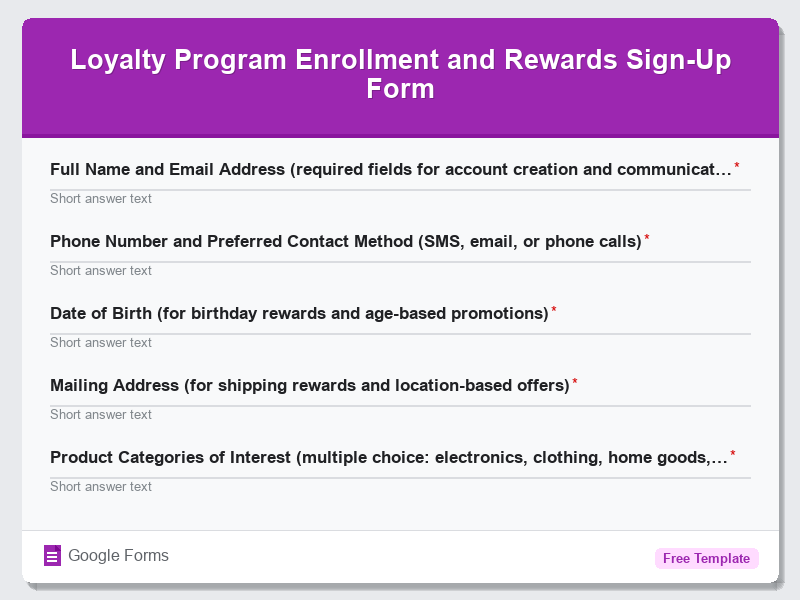
What is the Loyalty Program Enrollment and Rewards Sign-Up Form?
The Loyalty Program Enrollment and Rewards Sign-Up Form is a comprehensive Google Forms template designed to help e-commerce businesses streamline their customer retention efforts by creating an efficient enrollment process for loyalty programs. This free form template enables businesses to collect essential customer information, preferences, and contact details needed to establish meaningful reward relationships with their customers. By implementing this E-Commerce Forms solution, businesses can transform one-time shoppers into loyal brand advocates while gathering valuable data for personalized marketing campaigns.
This versatile form template serves as a digital gateway for customers to join reward programs, allowing businesses to automatically capture enrollment data through Google Forms’ user-friendly interface. The form is strategically designed to balance comprehensive data collection with user experience, ensuring high completion rates while gathering actionable insights about customer preferences, shopping habits, and communication preferences. Whether you’re launching a new loyalty program or upgrading your existing customer retention strategy, this form template provides the foundation for building lasting customer relationships through structured reward systems.
Who Should Use This Form?
This Google Forms template is ideal for e-commerce store owners, retail managers, marketing professionals, and small business entrepreneurs who want to implement or improve their customer loyalty programs without investing in expensive software solutions. Online retailers selling fashion, electronics, beauty products, home goods, or any consumer products can benefit from this free form template. Additionally, service-based businesses such as restaurants, cafes, fitness centers, beauty salons, and subscription box companies can adapt this E-Commerce Forms template to suit their specific loyalty program requirements. Digital marketing agencies managing multiple client accounts will find this form template particularly valuable for quickly deploying loyalty enrollment systems across various business verticals.
Form Questions & Fields
- Full Name and Email Address (required fields for account creation and communication)
- Phone Number and Preferred Contact Method (SMS, email, or phone calls)
- Date of Birth (for birthday rewards and age-based promotions)
- Mailing Address (for shipping rewards and location-based offers)
- Product Categories of Interest (multiple choice: electronics, clothing, home goods, beauty, etc.)
- Annual Shopping Frequency (dropdown: monthly, quarterly, bi-annually, annually)
- Preferred Reward Types (points, discounts, free products, early access, exclusive events)
- Communication Preferences and Newsletter Subscription Options
- Referral Source (how did you hear about our loyalty program)
- Terms and Conditions Acceptance Checkbox with Privacy Policy Agreement
How to Use This Google Form Template
- Access the Loyalty Program Enrollment form template through Google Forms and click “Use Template” to create your own customized version. Sign in to your Google account to save and edit the form according to your business requirements and branding guidelines.
- Customize the form fields by modifying questions, adding your company logo, and adjusting the color scheme to match your brand identity. Remove or add questions based on your specific loyalty program structure and the type of customer data you need to collect for effective program management.
- Configure form settings including response collection options, email notifications for new submissions, and integration with Google Sheets for automatic data organization. Set up response validation rules to ensure data quality and reduce incomplete submissions that could impact your customer database.
- Test the form thoroughly by completing it as a customer would, checking all field validations, required fields, and confirmation messages. Share the test form with team members to gather feedback on user experience and identify any potential improvements before launching publicly.
- Deploy the form across your marketing channels including website integration, social media campaigns, email newsletters, and in-store QR codes. Monitor form analytics through Google Forms dashboard to track enrollment rates and optimize the form based on user behavior and completion statistics.
Benefits of Using This Form
This Google Forms template offers significant advantages for businesses implementing loyalty programs, including cost-effective deployment without requiring technical expertise or expensive software subscriptions. The automated data collection and organization features save countless hours of manual data entry while ensuring accuracy and consistency in customer information management. Integration with Google Sheets enables real-time reporting and analytics, allowing businesses to track enrollment trends, identify popular reward preferences, and segment customers for targeted marketing campaigns. Additionally, the mobile-responsive design ensures optimal user experience across all devices, maximizing enrollment rates and reducing abandonment, while Google Forms’ built-in security features protect sensitive customer data and ensure compliance with privacy regulations.