Corporate Training Enrollment and Registration Form
What is the Corporate Training Enrollment and Registration Form?The Corporate Training Enrollment and Registration Form is a comprehensive Google Forms t…
What is the Corporate Training Enrollment and Registration Form?
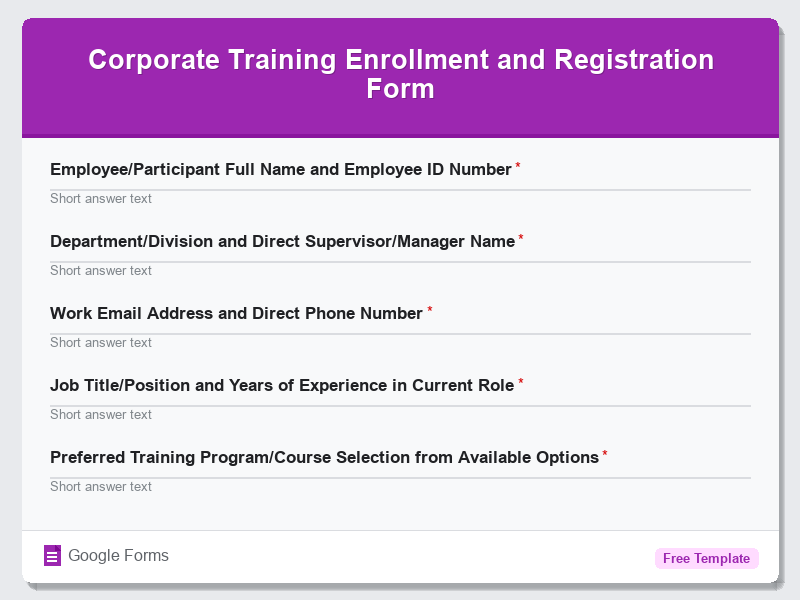
The Corporate Training Enrollment and Registration Form is a comprehensive Google Forms template designed to streamline the process of collecting employee information and preferences for professional development programs. This free form template serves as a centralized registration system that allows organizations to efficiently manage training enrollments, gather participant details, and coordinate logistics for various corporate learning initiatives. Whether you’re organizing leadership workshops, technical skills training, compliance sessions, or team-building activities, this form template provides a structured approach to capture all necessary participant information in one convenient location.
Built specifically for the Registrations & Events category, this Google Forms template eliminates the administrative burden of manual enrollment processes while ensuring accurate data collection for training coordinators and HR professionals. The form template incorporates essential fields that help organizations understand employee training needs, track participation rates, and maintain comprehensive records for compliance and reporting purposes. By utilizing this digital registration system, companies can reduce paperwork, minimize errors, and create a more professional enrollment experience that demonstrates their commitment to employee development and organizational efficiency.
Who Should Use This Form?
This Corporate Training Enrollment and Registration Form template is ideal for HR managers, training coordinators, learning and development specialists, team leaders, and corporate trainers who need to organize and manage professional development programs. Small businesses, medium-sized companies, large corporations, consulting firms, and educational institutions offering corporate training services will find this Google Forms template particularly valuable. The form is perfect for managers coordinating mandatory compliance training, soft skills workshops, technical certification programs, onboarding sessions, leadership development courses, and continuing education initiatives. Additionally, external training providers, conference organizers, and professional development consultants can adapt this free form template to register participants for seminars, webinars, and multi-day training events while maintaining professional standards and comprehensive participant records.
Form Questions & Fields
- Employee/Participant Full Name and Employee ID Number
- Department/Division and Direct Supervisor/Manager Name
- Work Email Address and Direct Phone Number
- Job Title/Position and Years of Experience in Current Role
- Preferred Training Program/Course Selection from Available Options
- Training Session Date and Time Preferences (if multiple sessions available)
- Previous Training Experience Related to Selected Program
- Specific Learning Objectives and Expected Outcomes from Training
- Accessibility Requirements or Special Accommodations Needed
- Emergency Contact Information and Dietary Restrictions (for full-day events)
How to Use This Google Form Template
- Access the Corporate Training Enrollment and Registration Form template through Google Forms and click “Use Template” to create your customized copy, then rename the form to reflect your specific training program or organizational requirements.
- Customize the form questions by adding your company branding, specific training program details, session dates, and any additional fields relevant to your particular training initiative, such as cost center codes or manager approval requirements.
- Configure the form settings by enabling email notifications for responses, setting up automatic confirmation emails for participants, and determining whether to limit responses to one per person or allow multiple registrations.
- Share the Google Forms template with your target audience by distributing the direct link via email, embedding it on your company intranet, posting it on internal communication platforms, or including it in training announcements and newsletters.
- Monitor responses through the integrated Google Sheets spreadsheet, track enrollment numbers against capacity limits, follow up with incomplete registrations, and use the collected data to prepare training materials, coordinate logistics, and communicate final details to registered participants.
Benefits of Using This Form
This Corporate Training Enrollment and Registration Form offers significant advantages for organizations seeking to professionalize their training management processes while leveraging the powerful capabilities of Google Forms. The template provides automated data collection and organization, eliminating manual data entry errors and reducing administrative overhead by up to 70% compared to traditional paper-based registration systems. Real-time response tracking through Google Forms enables training coordinators to monitor enrollment progress, identify popular training sessions, and make informed decisions about resource allocation and capacity planning. The integrated reporting features allow organizations to generate comprehensive participant lists, track training completion rates, maintain compliance records, and analyze training program effectiveness through detailed analytics and customizable reports that support continuous improvement initiatives.
Similar Form Templates
More free Registrations & Events templates you might find useful
Webinar Registration Form for Digital Marketing Events
View Template
Trade Show Exhibitor Registration and Booth Request
View Template
Tech Summit and Innovation Conference Registration
View Template
Annual Industry Awards Nomination and Registration Form
View Template
Community Event Sign-Up and Attendance Form
View Template