
AI Quiz Generator for Google Forms
Describe a topic and get a Google Forms quiz with the answer key and points already set. You review it before anything is created.
Writing a quiz is two jobs: the questions, and the answer key. In Google Forms you do the second one question by question, in a panel that is fiddly on a laptop and slower still on a phone. The quiz generator in our app does both. You describe the topic, it writes the questions and fills in the correct answers and the points, and you review everything before a single form is created in your Google account.
What you get is a real Google Forms quiz in your own Drive, not a copy inside another service. Students answer it with an ordinary Google Forms link, on any phone or computer, and Google Forms grades each submission against the key.
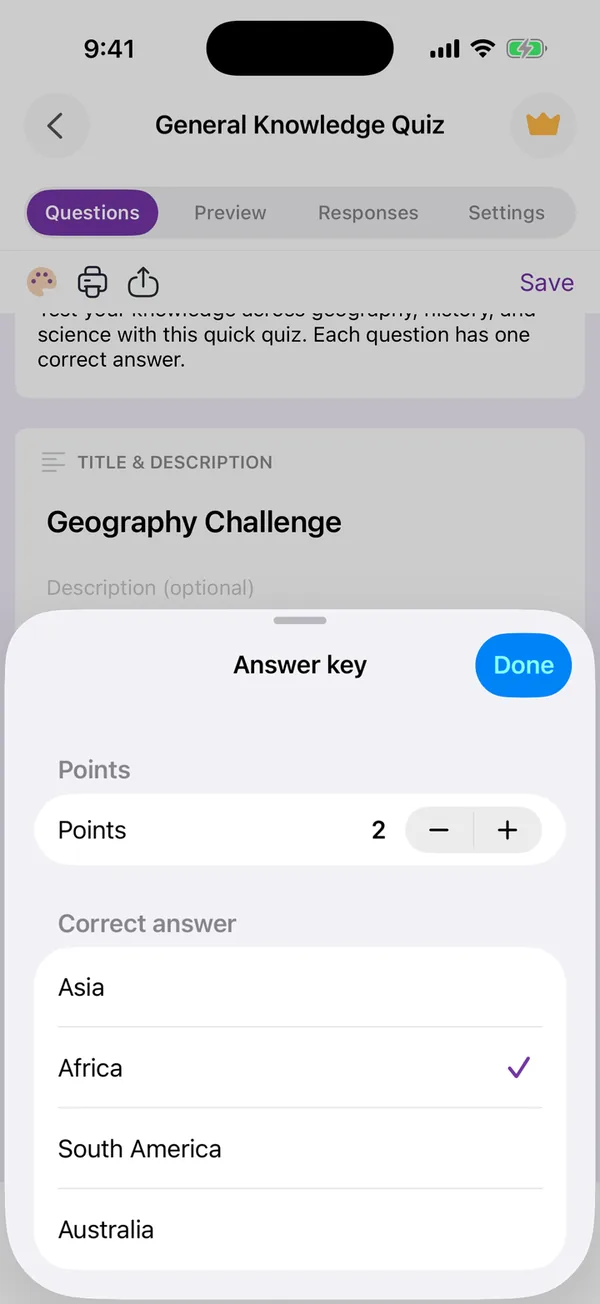
Read the key before you share the quiz. AI can get a fact wrong, and on a quiz one wrong key costs a point to every student who answered correctly. Checking takes a few seconds per question in the Answer key sheet, and you can change the points there too.
Two limits to know. Automatic grading works for questions with fixed answers: multiple choice, checkboxes, dropdowns, and short answers with an exact expected text. Long written answers still have to be marked by hand in Google Forms. And quizzes with automatic grading are part of Premium in the app; creating and sharing ordinary forms is free with ads.
If you would rather start from a tested set of questions, the classroom quiz template lists ten end-of-lesson questions, with the steps to make Google Forms mark them for you.
Why it helps
The answer key is written for you
The AI sets the correct answer and the points for every question it writes, so the slowest part of building a quiz is done before you start. You only check it.
A real Google Forms quiz
It is created in your own Google Drive through Google's Forms API. Google Forms grades every submission, and you can keep editing the quiz in Google Forms on a computer.
In the language of the class
Pick English, French or Arabic in the composer, or leave it on Auto, and set the tone: neutral, professional or friendly.
How to do it
-
1
Describe the topic and choose Quiz
In Create with AI, write what the quiz should cover, for example "ten questions on the water cycle for 12-year-olds". Set the form type to Quiz, then choose 5, 7, 10 or 15 questions, the language and the tone.
-
2
Review the questions and the key
The preview lists every question. Tap Regenerate if the set is off, or Use this form when it is right. Then open the Answer key of each question to check the correct answer and the points.
-
3
Share it with the class
Send the link, or show the fullscreen QR code on the board. Students answer in any browser, without the app, and Google Forms grades each submission.
Questions people ask
- Is this a real Google Forms quiz?
- Yes. The app creates it in your own Google account through Google's Forms API. You can open it and keep editing it in Google Forms on any computer.
- Does the AI fill in the correct answers?
- Yes. It sets the correct answer and the points for each question it writes. Check them before you share the quiz: a wrong key costs a point to every student who answered correctly.
- Which questions are graded automatically?
- Questions with fixed answers: multiple choice, checkboxes, dropdowns, and short answers with an exact expected text. Paragraph answers are marked by hand in Google Forms.
- Do students need the app?
- No. They open a normal Google Forms link, or scan the QR code, on any phone or computer.
- Is it free?
- Creating and sharing forms is free with ads. Quizzes with automatic grading are part of Premium. If a free trial is available on a subscription, Apple shows it before you confirm.
- Which devices does the app run on?
- iPhone and iPad (iOS 15.6 or later), Macs with Apple silicon, and Apple Vision Pro. There is no Android version.
Generate a quiz in the app
Related tools
Turn a Paper Form into a Google Form
Photograph a printed questionnaire and get a real Google Form in your Drive. The page is read on your device, never uploaded.
QR Code Generator for Google Forms
Paste a Google Form link, get a QR code ready to print. Free, no sign-up, and nothing leaves your browser.