
Google Forms on iPad: What Changes from the iPhone
Yassine Jaa Published 11 minute read
There is no Google Forms app for the iPad, and on most iPads you will not miss it: open forms.google.com in Safari and you get the full desktop editor, the one you would see on a laptop, with its tools in a floating bar to the right of your questions. The exception is the iPad mini held upright, which gets the phone layout instead. More on that below, because the reason is not what Apple’s settings suggest.
I tested everything on this page on 21 October 2026 in Apple’s Simulator, on an iPad Air 13-inch (M4) and an iPad mini (A17 Pro), both on iPadOS 27.0, signed in to a demo Google account. The test form was a sign-up for a Year 7 trip to the Natural History Museum: five questions, a class dropdown, a yes/no for the coach that skips a section, and a parent email with validation. All the names in the screenshots are made up.
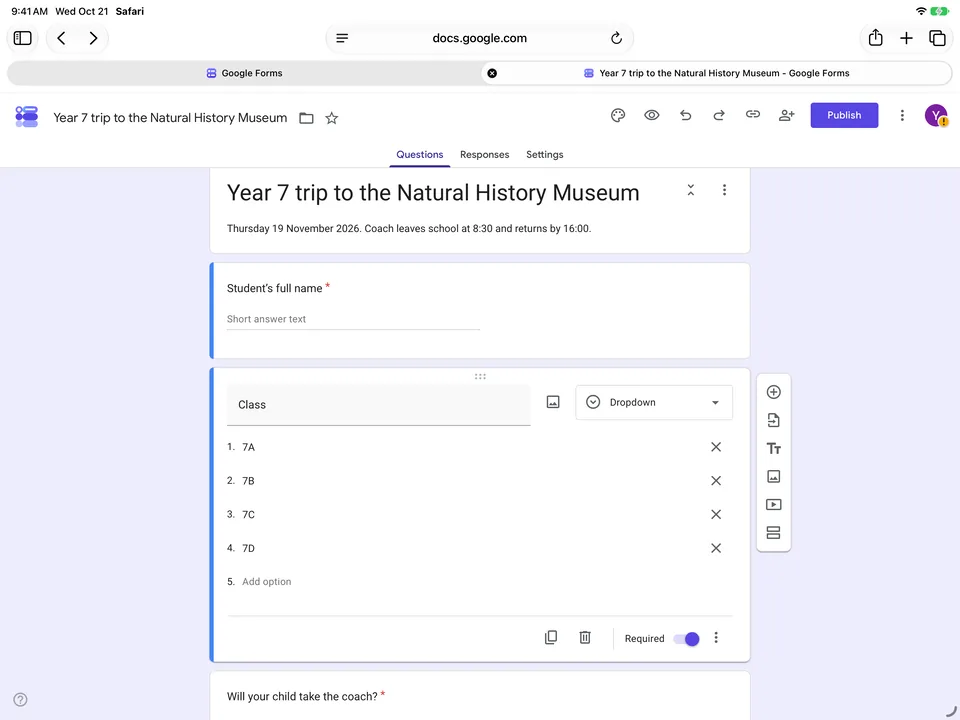
A desktop editor, used with a finger
On my iPhone, two questions took seven minutes, mostly lost to the keyboard covering whatever I was typing into (the phone overview tells that story). The iPad is better, but not by as much as the screen size suggests. In landscape the on-screen keyboard still takes the bottom half of the display. Safari scrolls the field you are typing in into view, and the rest of the card, with the answer options and the Required switch, stays hidden behind the keys until you dismiss them.
Google does some of the typing for you now. Write “Will your child take the coach?” and the editor switches the question to multiple choice by itself, with a line under it reading “Suggestions: Add all · Yes · No · Maybe”. One tap and the options are there. A notice explains that “Question types magically update based on your question”, which is accurate, if a little pleased with itself.
Moving a question is where the mouse-shaped design shows. My first drag on the six-dot handle scrolled the page and left the question where it was. It works if you tap the card first to select it, then hold the handle for about a second before moving. That got a question up or down within its section. Dragging it into the other section failed both times I tried, ending in iPadOS text selection instead, and the quickest fix was to delete the question and build it again where it belonged. Google offers an Undo after a delete, in case you pick the wrong one.
Branching, which I tell people not to attempt on a phone, is fine here. In the question’s ⋮ menu, “Go to section based on answer” puts a menu next to each option, and the rows are big enough for a finger: Continue to next section, Go to section 1, Go to section 2, Submit form. Long section titles get cut in the middle, so give your sections short names.
One small thing that will catch you later. The file in your Drive stays “Untitled form” even after you have typed a title on the form itself. The Drive name is the one at the top left of the editor, and it only changes if you change it there.
Adding a header photo from the iPad
It works, but the obvious button is the wrong one. In the palette panel, Header has a Choose Image button. The window that opens sat empty for about six seconds before showing its tabs: Themes, Photos, Google Drive, Google Images, By URL, Upload. “Photos” there means Google Photos, not the photo library on your iPad. For a picture you took on the iPad, go to Upload, then Browse, and pick Photo Library from the menu iOS shows.
Tapping a photo in the picker only selects it (“1 Photo Selected”); you then tap the blue tick to confirm. Google lets you crop it in a Position Header step, you tap Save, and the form takes the photo as its banner and its colour theme from the photo. About two minutes, start to finish.
Why the iPad mini looks like a phone
On the iPad mini, Safari asks for the mobile version of sites by default, so the editor arrives with the same six-icon bar along the bottom that you get on an iPhone. The setting is in Settings › Apps › Safari › Settings for Websites › Request Desktop Website, where “All Websites” is on by default on the iPad Air and off on the mini. For one site only, tap the ≡ icon to the left of the address and choose Request Desktop Website.
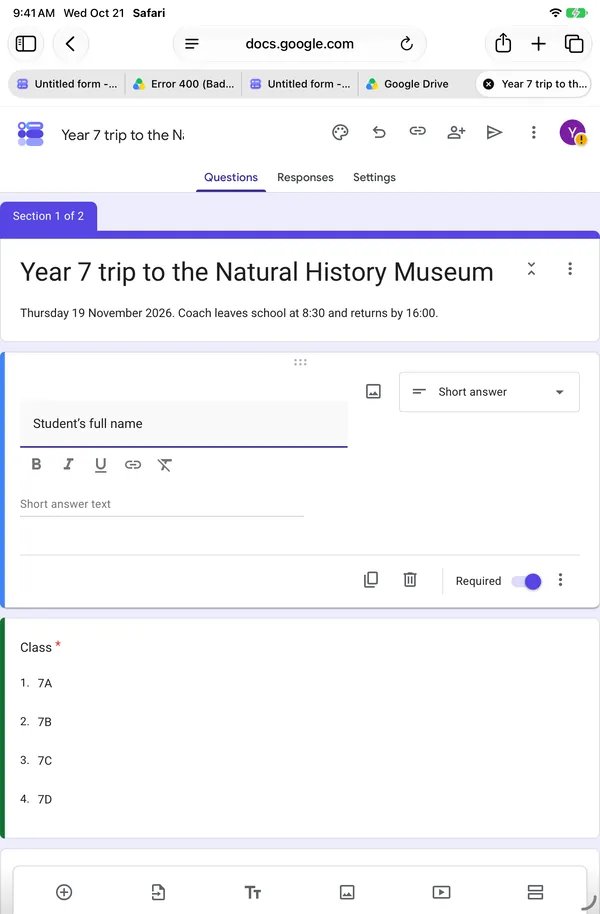
Here is the surprise. Even with the desktop site requested, the mini kept the bottom bar in portrait. Turned to landscape, the floating bar on the right appeared. Google lays out its editor by the width of the window, not by the device, so on a mini the useful advice is simply to turn it sideways. The same applies on a larger iPad if you shrink Safari’s window: narrow window, phone layout.
Forms and Sheets side by side
What an iPad can do and a phone cannot is two windows at once. On the iPads I tested, iPadOS 27 was set to run apps in resizable windows, so there is no old-style Split View; you arrange windows with the three dots at the top of each one.
The part that took a while is getting the spreadsheet into its own window. “View in Sheets” in the Responses tab opens the sheet as a new tab in the same window, and since it is not a link, there is no “Open in New Window” on a long press. What works is a long press on the tab itself, then Move Tab to New Window. After that, placing the two windows side by side is a matter of dragging and patience.
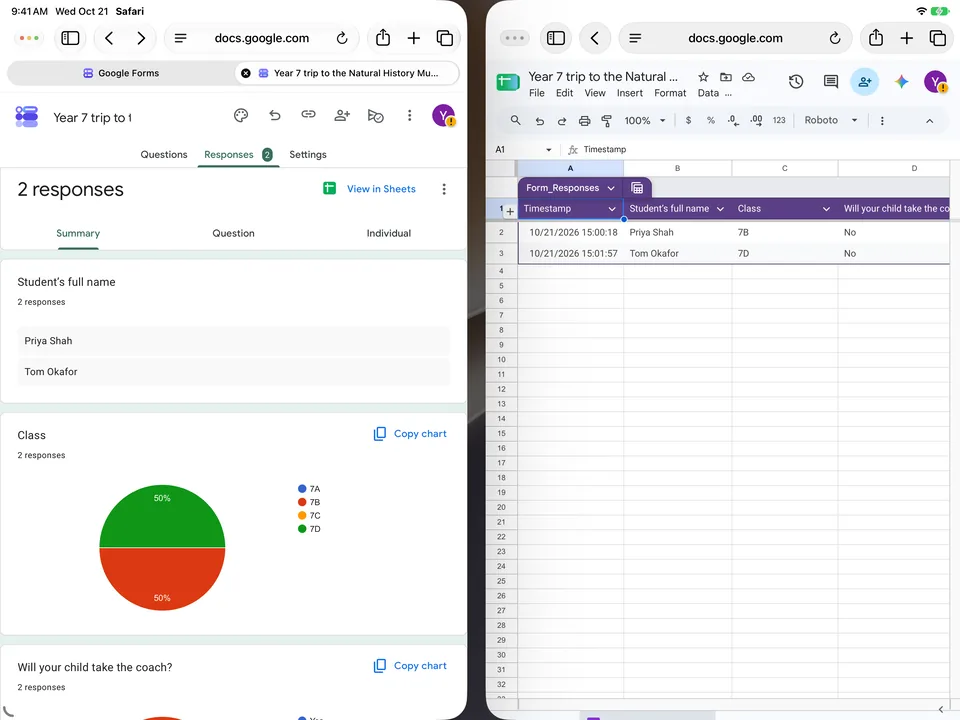
It was worth it. I sent a test response and timed it: the new row appeared in Sheets about a third of a second after I pressed Submit, before the form had even finished confirming, and the counter in Forms read “2 responses” at 1.2 seconds. Neither window needed a reload.
One iPad at a sign-up stand
This is the job I think an iPad does better than anything else Google Forms runs on: a single tablet on a table at an open day, collecting names one visitor after another. Google Forms has no kiosk mode, so you assemble one, and the details matter more than they look.
Open the form in a private tab. This is not about AutoFill, which in my tests never offered one visitor’s answers to the next, in either kind of tab. It is about your Google account. In a normal tab, signed in, the form opened with an “Autosave your work” message, showed my account’s email address at the top of the form with the label “Not shared”, and saved each visitor’s half-typed answers as a draft against my account. On a stand, every visitor would see your address. In a private tab, that line becomes “Sign in to Google to save your progress”, and nothing is tied to you.
One trap with private tabs: a link opened from outside Safari went into a normal, signed-in tab even with the private window in front. Paste the link into the private tab yourself.
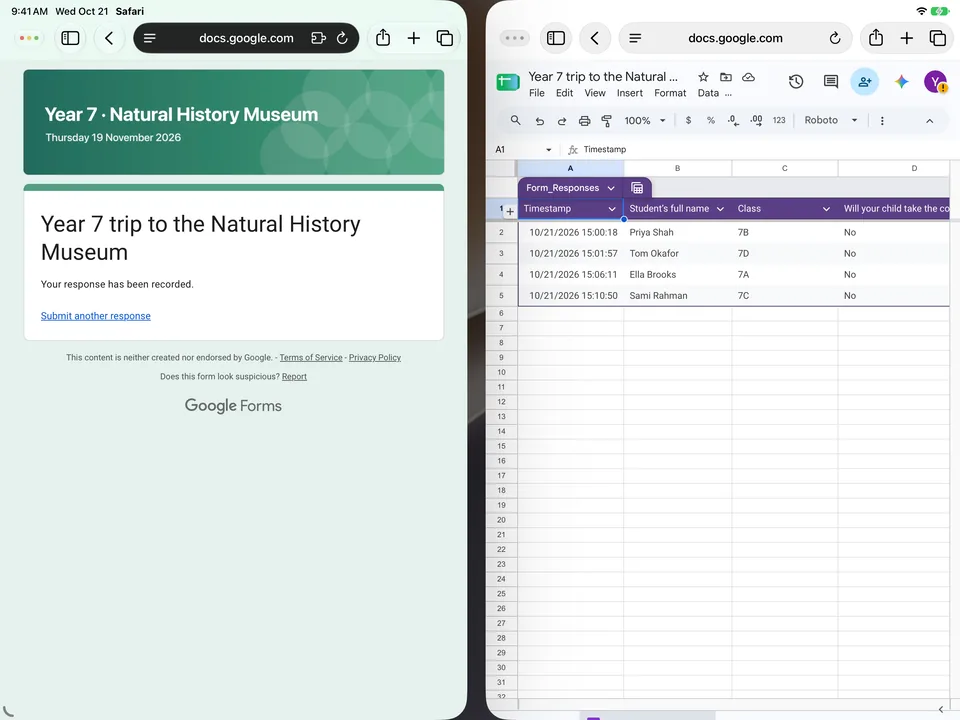
Each visitor then goes through two screens, not one. With a section that can be skipped, the button at the bottom stays “Next” even when the answer sends people straight to the end, and Next leads to a page that says “Click submit to finish”. Mention that on a card next to the iPad, or you will watch people stop at Next and walk away. After Submit, the page shows “Your response has been recorded.” and a “Submit another response” link, which is your reset button: it opens a blank form, with nothing carried over.
Do not switch on “Limit to 1 response” for a stand. Google files it under “Requires sign in”, and it means what it says: in the private tab, the form appeared greyed out behind a box saying “Sign in to continue — To fill out this form, you must be signed in. Your identity will remain anonymous.” Tapping beside it does nothing. Nobody in your queue is going to type a Google password into your tablet, and they should not.
Last, lock the iPad to Safari with Guided Access, which iPadOS includes: Settings › Accessibility › Guided Access, switch it on and set a passcode, then triple-click the top button with the form on screen. I have to be straight about this step. The Simulator cannot do the triple-click, so these instructions come from Apple’s documentation rather than from a stand I have run myself. For printed sign-up sheets nearby, a QR code lets people answer on their own phones, which shortens the queue more than any setting.
What the app adds on an iPad
AI Form for Google Docs, the app this site is built around, runs on the iPad, and I should be honest about what that means today. Its screens are the iPhone screens, given more room. The editor is a centred column of question cards with wide margins on each side; there is no sidebar and no two-pane view. The share screen is a centred panel rather than a full-width sheet.
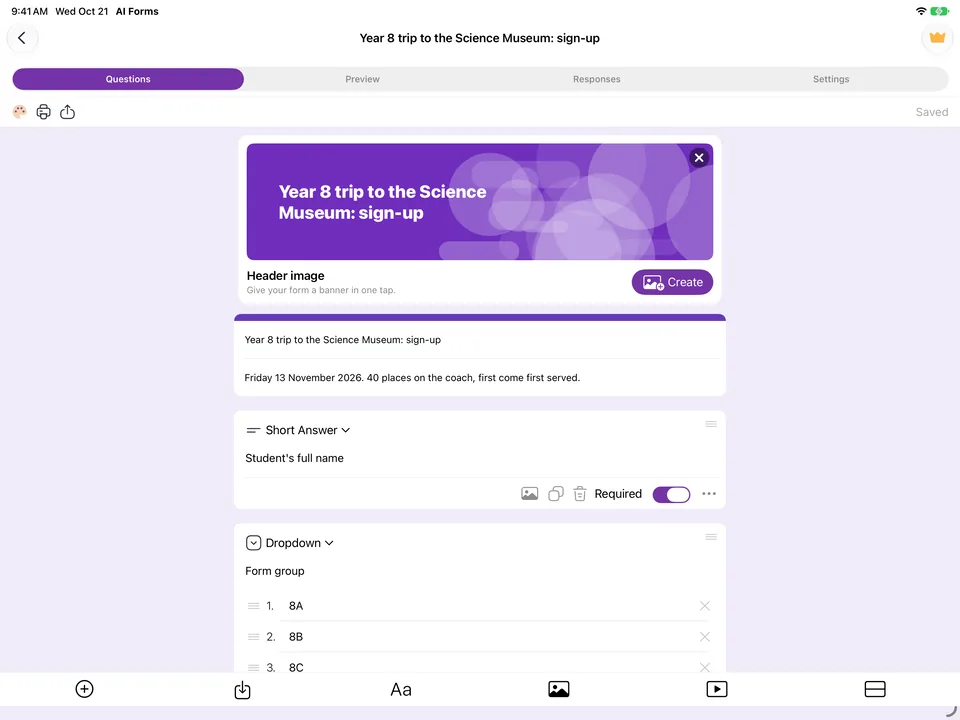
For my own forms on the iPad, I use the app anyway, and the reason is less about the screen than about what sits on it. Every tool I need is in one window with clear buttons: the AI writes questions straight into the form, without copying a prompt into a chatbot and pasting the result back; the scanner turns a paper questionnaire into a form; the share screen makes a QR code; and it has a gallery of header images to pick from. Google’s editor in Safari does none of those four things. It also feels quicker to manage a form that way than in a desktop editor scaled down for a finger.
The QR code is the screen I would use at a stand. It fills the display in black and white with “Scan to answer” above the code, turns the brightness up for a dim hall, and saves the code as PNG or SVG for a poster.
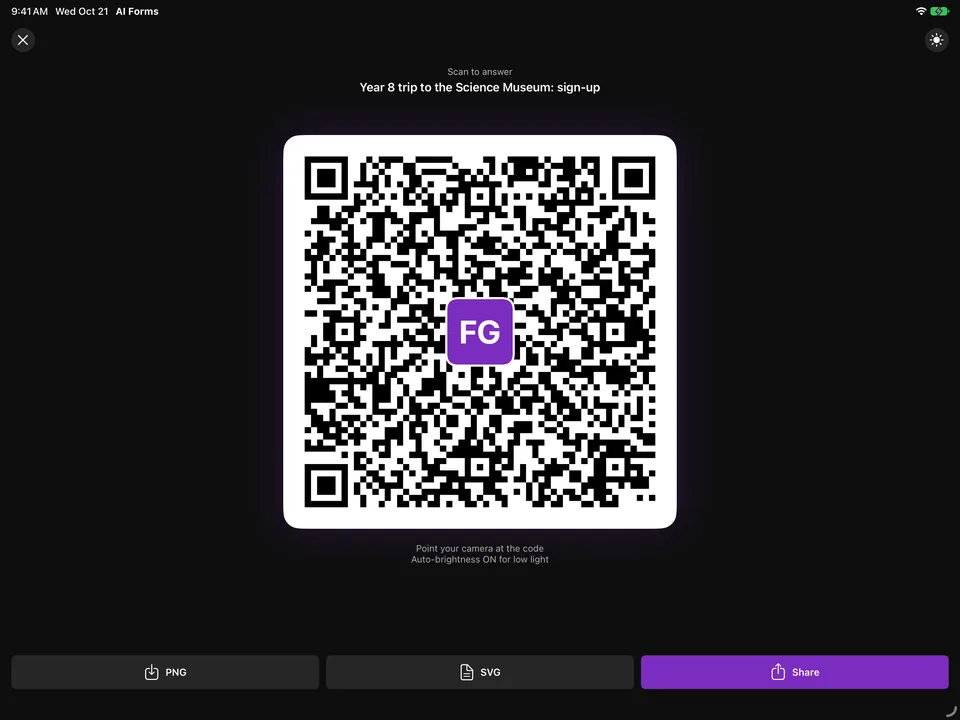
Two limits from the same afternoon. The app only lists forms you have created or opened in it; a form built in Safari has to be added through “Add from Google Drive” first, and the one I had just built in Safari did not open in the app during this test. And Safari is still the better choice for the few settings the app does not cover, and it costs nothing.
If you are setting up for an event, the event registration template is a reasonable start, and the closing guide covers stopping the form when the places run out.
Build the form on the device you already have
Keep reading
Using Google Forms on a Phone: What Actually Works
I built, published and read a Google Form from an iPhone in Safari, screen by screen. What the mobile editor does well, the two things it does badly, and where an app changes the arithmetic.
Six Google Forms Settings Most People Never Switch On
Six settings that are already in Google Forms and rarely switched on, with the menu paths checked against Google’s documentation — and the one that will cost you responses.
How to Create a Google Form on iPhone (Step by Step)
Seven steps in Safari, each with a screenshot from an iPhone: open a blank form, add questions, set the theme, publish, copy the link, test it, read the responses.
Tools for this task
QR Code Generator for Google Forms
Paste a Google Form link, get a QR code ready to print. Free, no sign-up, and nothing leaves your browser.
In the appTurn a Paper Form into a Google Form
Photograph a printed questionnaire and get a real Google Form in your Drive. The page is read on your device, never uploaded.